
TL;DR:
- Getting architectural signage right involves balancing visual impact with regulatory compliance, accessibility, and practical installation constraints.
- A comprehensive checklist addressing UK planning laws, design for legibility, accessibility standards, strategic placement, and material selection ensures signage is effective, compliant, and brand-aligned.
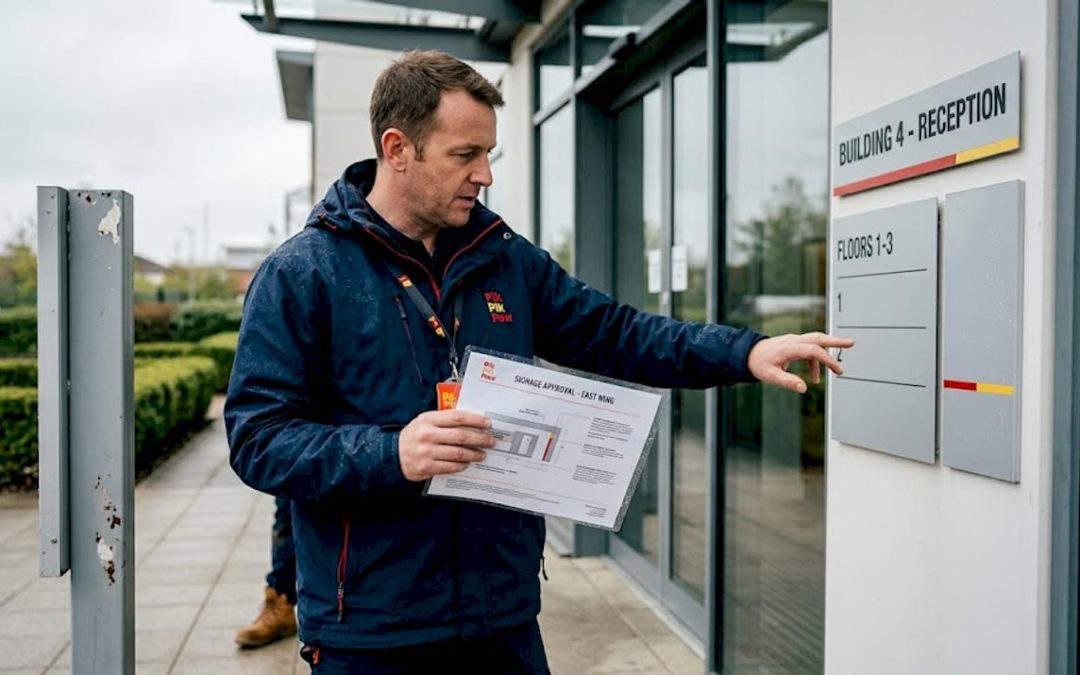
Getting architectural signage right requires more than good design instincts. Every business commissioning signage in the UK faces the same challenge: balancing visual impact with regulatory compliance, accessibility requirements, and practical installation constraints. Without a clear architectural signage checklist, it is easy to miss critical criteria that lead to planning delays, costly reworks, or signage that simply fails to perform. This guide covers every essential checkpoint, from UK planning regulations and legibility standards to material selection and strategic placement, so you can approach your signage project with clarity and confidence.
Table of Contents
- Architectural signage checklist: compliance with UK regulations and planning permissions
- Checklist item 2: design for legibility and visibility
- Checklist item 3: accessibility standards for inclusion
- Checklist item 4: strategic placement and integration with architecture
- Checklist item 5: selecting signage types and materials
- Comparison and decision matrix for architectural signage
- Why a considered checklist beats ad hoc signage decisions
- How Pik Pik POW! enhances your architectural signage journey
- Frequently asked questions
Key Takeaways
| Point | Details |
|---|---|
| Regulatory compliance essential | Confirm planning consent requirements and electrical standards for signage before installation. |
| Legibility rules | Follow the 25mm-per-3-metre letter height and use high contrast for clear visibility. |
| Accessibility matters | Incorporate tactile, Braille, and low-glare materials to make signage inclusive. |
| Integrate with architecture | Design signage placement to support natural navigation and brand consistency. |
| Choose suitable materials | Match signage type to environment needs balancing durability, visibility, and cost. |
Architectural signage checklist: compliance with UK regulations and planning permissions
Before you finalise any design, you need to understand the legal framework governing signage installation in England. The primary legislation is the Town and Country Planning (Control of Advertisements) Regulations 2007, which defines when you need consent and when you do not.
Many standard business signs, such as fascia signs, projecting signs, and forecourt signs, benefit from deemed consent, meaning you can install them without applying to your local planning authority, provided they meet specific size and positioning criteria. However, as noted in guidance on effective business signage, most standard signage benefits from deemed consent, but conservation areas and listed buildings may require explicit Advertisement Consent. If your premises sits within a conservation area or is a listed building, always check with your local authority before proceeding.
Key regulatory checkpoints for your signage project checklist:
- Planning permission: Confirm whether your sign qualifies for deemed consent or requires express Advertisement Consent.
- Conservation areas and listed buildings: Submit a formal application before any installation.
- Illuminated signs: These must comply with BS 7671 wiring regulations and be installed by a qualified electrician.
- Projecting signs over footpaths: Minimum clearance of 2.5 metres above the pavement applies in most local authority areas.
- Outdoor signage requirements: Size, luminance, and positioning restrictions vary by sign class under the 2007 Regulations.
Understanding architectural signage basics before you brief a designer will save significant time in the approval process.
Checklist item 2: design for legibility and visibility
Once your regulatory position is confirmed, the design stage begins. Legibility is not subjective. There are established rules that determine whether your sign will be read at the distances that matter for your business.

The most widely used rule is the 25mm letter height per 3 metres of viewing distance. If your sign needs to be read from 15 metres away, your text height should be at least 125mm. This applies whether you are designing a retail fascia sign, a building entrance sign, or a projecting sign on a commercial premises.
Colour contrast is equally important. Dark text on a light background consistently outperforms light text on dark backgrounds for daytime legibility, though illuminated signs can reverse this successfully at night. Avoid tone-on-tone combinations, such as navy on dark grey, which appear fine in design software but fail completely on site.
Practical design rules to include in your signage project checklist:
- Use a maximum of two typefaces to avoid visual noise.
- Prioritise weight and spacing over decorative styling.
- Consider illuminated signs if your business operates in the evening or in low-light locations.
- Test your colour combinations at the intended viewing distance before production.
Pro Tip: If your sign will be viewed from a moving vehicle, increase letter height by at least 30% beyond the standard formula to account for reduced dwell time.
Reviewing outdoor signage design tips will help you apply these principles to your specific context.
Checklist item 3: accessibility standards for inclusion
Accessibility in signage is not optional, and it goes beyond fitting a Braille panel. The relevant UK standard is BS 8300-2:2018, which details requirements for character heights, luminance contrast, tactile and Braille information on door signage for buildings accessible to the public.
The standard sets out specific criteria for mounting heights, contrast ratios, and tactile features. Getting these right protects you legally and ensures your space is genuinely inclusive.
Essential accessibility requirements for your checklist:
- Mount tactile and Braille signs between 1150 mm and 1550 mm above floor level.
- Use low-gloss, non-reflective materials to reduce glare, particularly under artificial lighting.
- Incorporate raised characters alongside Braille for users who cannot read Braille but rely on tactile cues.
- Ensure luminance contrast between text and background meets the minimum 70% differential recommended under BS 8300-2:2018.
- Do not position signs behind glazed barriers or in locations where they cannot be approached directly.
A practical process for incorporating accessibility into your signage project:
- Identify all sign locations where members of the public will require directional, informational, or identification signage.
- Specify tactile and Braille requirements for each location at the design brief stage.
- Select materials with confirmed luminance contrast measurements, not estimated ones.
- Confirm mounting heights with the installation team before fabrication.
- Schedule a post-installation review to verify positioning and legibility under actual lighting conditions.
For a detailed walkthrough of accessible design in practice, see guidance on accessible wayfinding signage.
Checklist item 4: strategic placement and integration with architecture
Where you position a sign matters as much as what it says. Poor placement is one of the most common and costly errors in commercial signage projects. A sign installed in the wrong location, even with excellent design, fails to serve its purpose.
The principle underpinning effective placement is well established. Effective wayfinding relies on integration of signage with architectural layout, circulation paths, and landmarks to foster intuitive navigation. In practical terms, this means placing signs at decision points, not just at destinations.
Placement principles to include on your checklist:
- Position entrance and identification signs to be visible from the primary approach direction.
- Place directional signs at every decision point along the circulation route, including corridor junctions and stair access points.
- Use architectural features such as columns, door surrounds, and ceiling soffits to anchor signs naturally within the space.
- Apply consistent colour coding or iconography across all sign types to create a unified visual communication system.
- Use modular signage systems where floor plans or tenant layouts are subject to change, so updates do not require full replacements.
A unified system reduces hesitation for visitors navigating your space for the first time, which directly affects customer experience in retail and public-facing commercial environments. Explore wayfinding signage strategies to apply this thinking to your own project.
Checklist item 5: selecting signage types and materials
Every signage type has strengths and limitations. Matching the right option to your environment, budget, and operational needs is central to an effective signage project checklist.
As a starting principle, illuminated signage enhances visibility in low-light conditions but requires electrical compliance and qualified installation. Tactile signs meet accessibility legal requirements and improve inclusivity for all users.
| Signage type | Best use case | Durability | Cost level | Maintenance |
|---|---|---|---|---|
| Illuminated (LED fascia) | Retail, hospitality, evening trading | High | Medium to high | Annual electrical check |
| Tactile and Braille | Indoor wayfinding, compliance | High | Medium | Low |
| Digital display | Retail, exhibitions, events | Medium | High | Regular software updates |
| Printed flat signage | Indoor, short-term campaigns | Low to medium | Low | Periodic replacement |
| Cut metal or acrylic | Architectural, prestige interiors | Very high | Medium to high | Minimal |
Material choice should reflect the exposure conditions the sign will face. Outdoor signage requirements demand weather-resistant substrates and UV-stable inks or finishes. An acrylic face plate suits a climate-controlled interior; it is not the right choice for an exposed exterior fascia in a coastal location.
Additional material selection considerations:
- Aluminium composite panels offer good rigidity and weather resistance for outdoor use.
- PVC foam board works well for short-term indoor signs but degrades in UV exposure.
- Brushed stainless steel or powder-coated aluminium suits prestige architectural applications.
- For temporary construction site signage, corrugated plastic sheeting is cost-effective and practical.
Pro Tip: Always request a material specification sheet from your signage supplier before approving production. Knowing the exact substrate, finish, and print process gives you a basis for comparing quotes fairly.
Explore the full range of illuminated signage benefits to understand whether this option suits your business environment.
Comparison and decision matrix for architectural signage
To help you apply the architectural signage checklist to your specific situation, the table below summarises key attributes across the most common signage types for UK retail, construction, and commercial interior settings.
| Attribute | Illuminated | Tactile/Braille | Digital | Printed flat | Cut metal/acrylic |
|---|---|---|---|---|---|
| Legibility at distance | Excellent | N/A (touch-based) | Excellent | Good | Good to excellent |
| UK compliance complexity | High (electrical) | Medium (BS 8300) | Medium | Low | Low |
| Upfront cost | High | Medium | Very high | Low | Medium to high |
| Outdoor durability | High | Medium | Medium | Low | Very high |
| Installation complexity | High | Low | Medium | Low | Medium |
| Suitable for retail | Yes | Yes | Yes | Yes | Yes |
| Suitable for construction sites | Limited | No | Limited | Yes | Limited |
| Suitable for commercial interiors | Yes | Yes | Yes | Yes | Yes |
Use this matrix alongside your budget, planning position, and brand requirements to reach a clear decision. For further decision-making support, the architectural signage decision guide covers common scenarios in depth.
Why a considered checklist beats ad hoc signage decisions
Here is an honest observation from years of working on signage projects across retail, construction, and commercial interiors: the projects that run over budget and miss deadlines almost always share one root cause. Decisions were made one at a time, without a unifying framework.
A business chooses a sign design first, then finds out it requires planning consent. They specify a material, then discover it does not meet outdoor signage requirements. They install wayfinding signs, then realise the mounting heights are non-compliant with accessibility standards. Each correction costs more than doing it right the first time would have. As the principle behind coordinated signage criteria confirms, effective signage is not guesswork. It is the result of coordinated criteria and regulatory compliance.
The architectural signage checklist approach changes this entirely. When you address compliance, design, accessibility, placement, and materials together, at the start of the project, you eliminate the expensive back-and-forth that derails timelines and inflates costs. You also end up with signage that works harder for your brand.
There is another dimension worth considering. Accessibility is often treated as a compliance box to tick. In reality, signage that is accessible to all visitors consistently performs better in navigation studies and customer satisfaction surveys. Inclusive design is not a cost. It is a quality standard that benefits everyone who uses your space.
Early collaboration between the design team, structural contractors, and installation specialists is where the real efficiency gains live. If the architect, signage designer, and site manager are working from the same architectural signage approach, the result is a coherent, compliant system rather than a collection of individual sign decisions.
How Pik Pik POW! enhances your architectural signage journey
Now that you have a clear architectural signage checklist to work from, putting it into practice is the next step.
At Pik Pik POW!, we work with UK businesses across retail, construction, and commercial interiors to plan, design, and produce signage that meets regulatory requirements, accessibility standards, and brand objectives. Our team handles everything from initial compliance checks and strategic placement planning through to fabrication and installation. Whether you need a full signage systems solution, a complete suite of internal and wayfinding signage, or a dynamic digital signage display, we manage the process from concept to completion. Get in touch to discuss your project and find out how we can help you achieve signage that works.
Frequently asked questions
What UK regulations must I consider when installing architectural signage?
You must comply with the Town and Country Planning (Control of Advertisements) Regulations 2007, and as the guidance confirms, conservation areas and listed buildings may require explicit Advertisement Consent even when standard signs benefit from deemed consent. Illuminated signs must also meet BS 7671 wiring standards.
How do I ensure my signage is readable from a distance?
Apply the rule that 25mm letter height per 3 metres of viewing distance is recommended for legibility, pair dark text with a light background for high contrast, and limit fonts to two for visual clarity.
What accessibility features should be included in architectural signage?
Include tactile raised letters and Braille, install signs at the 1150 to 1550 mm height range as specified in BS 8300-2:2018, use low-glare materials with high luminance contrast, and provide clear visual symbols to support navigation.
When should illuminated signage be used?
Use illuminated signage when your business operates after dark or in low-light environments, since illuminated signs enhance visibility considerably in these conditions, but always ensure installation is carried out by a qualified electrician to meet electrical safety requirements.