

TL;DR:
- Effective school signage is a visual communication system that guides, informs, and protects everyone in a learning environment. It must meet legal standards, be highly visible, and support safety, navigation, and engagement through well-designed physical and digital signs.
Effective school signage is defined as a structured system of visual communication that directs, informs, and protects everyone within a learning environment. This educational space signage guide covers every category schools need, from ADA-compliant room identification to digital displays that capture student attention the moment they walk through the door. Research shows 87% of students notice digital signs immediately on entry, and 81% prefer digital over static media. Those figures alone tell you that signage is not a background detail. It shapes how students, staff, and visitors experience your school from the first second they arrive.
What does an educational space signage guide cover?
A complete signage system for schools addresses six core functions: wayfinding, safety, room identification, entrance and traffic management, emergency communication, and motivational display. Each function serves a distinct purpose, and neglecting any one of them creates gaps that affect daily operations. A well-planned signage system supports safety, navigation, brand consistency, and creates a welcoming environment that improves visitor and student experiences.
The six signage categories schools need
- Entrance and traffic signs: These manage vehicle and pedestrian flow at school gates, car parks, and drop-off zones. Clear entrance signage reduces accidents and sets the tone for visitors before they reach reception.
- Wayfinding signs: Directional arrows, floor maps, and corridor signs guide students and visitors to classrooms, offices, and facilities. Poor wayfinding wastes time and causes frustration during busy changeover periods.
- Room identification signs: Every classroom, office, and facility needs a permanent sign that meets legal standards. Under ADA guidelines, permanent room signs must include raised characters and Braille; flexible inserts can carry changeable details such as a teacher’s name.
- Emergency and safety signs: Fire exit routes, assembly point markers, and first aid locations are non-negotiable. These signs must comply with BS 5499 pictogram standards in the UK and must remain clearly visible at all times.
- Motivational and curriculum displays: Corridor and classroom displays that reinforce school values, celebrate achievement, and support learning objectives. These are the signs that make a school feel alive rather than institutional.
- Digital communication displays: Screens in reception areas, dining halls, and corridors that carry timetables, announcements, and event information in real time.
Legal requirements you cannot ignore
ADA-compliant tactile and Braille features are mandatory on permanent room signs. Raised characters must sit between 0.8 mm and 1.5 mm above the sign face. The sign itself must be mounted on the latch side of the door, with the centreline at 1,500 mm from the floor. Multilingual signage is not a legal requirement in most UK schools, but it is a strong operational choice in communities with significant numbers of non-English-speaking families. Modular signage systems that accept interchangeable inserts give you the flexibility to update room details without replacing the entire sign, which matters on a campus that reorganises classrooms regularly.
| Signage type | Key compliance point |
|---|---|
| Permanent room signs | Raised characters and Braille; mounted at 1,500 mm centreline |
| Emergency exit signs | BS 5499 pictograms; illuminated where required |
| Wayfinding signs | Consistent font and colour; unobstructed sightlines |
| Digital displays | Content accessibility; readable contrast ratios |
How should you design signage for a learning environment?
Design for signage in learning environments starts with legibility, not aesthetics. A sign that looks attractive but cannot be read from 5 metres away has failed its primary job. Colour and font consistency tied to school branding builds recognition and reinforces identity across the whole campus.

Typography and colour
Sans-serif typefaces such as Arial, Helvetica, or Johnston perform best on directional and identification signs. They read cleanly at distance and at small sizes. Contrast is equally critical: dark text on a light background, or light text on a dark background, with a minimum contrast ratio of 4.5:1 as recommended by the Web Content Accessibility Guidelines (WCAG). Avoid decorative fonts on functional signs, even in primary schools where the temptation to use playful lettering is strong.
Colour coding by zone or department is a proven wayfinding technique. Assigning a distinct colour to science blocks, arts facilities, and administrative areas means students and visitors can navigate by colour alone, which reduces cognitive load during busy periods.
Icons and visual supports
Visual supports using images aid children’s understanding of routines, materials, and behavioural expectations, increasing independence and engagement. This is particularly valuable for younger students, those with learning differences, and pupils for whom English is an additional language. Pairing a pictogram with text on every wayfinding sign costs nothing extra in production but significantly widens the sign’s usability.
Pro Tip: Use the same icon set consistently across every sign on campus. Mixing icon styles from different sources creates visual noise and undermines the clarity you are trying to build.
Digital signage and student engagement
Digital signage’s versatility provides opportunities to connect with the digital-native student generation through engagement features like QR codes and social media walls. Screens in reception and dining areas can display live timetable changes, safeguarding notices, and celebration content without any physical reprinting. This is where interior wayfinding in education starts to overlap with active communication rather than passive direction.
How to implement signage in schools: a step-by-step process
A structured approach prevents the most common mistake in school signage projects: buying signs before you understand what you actually need.
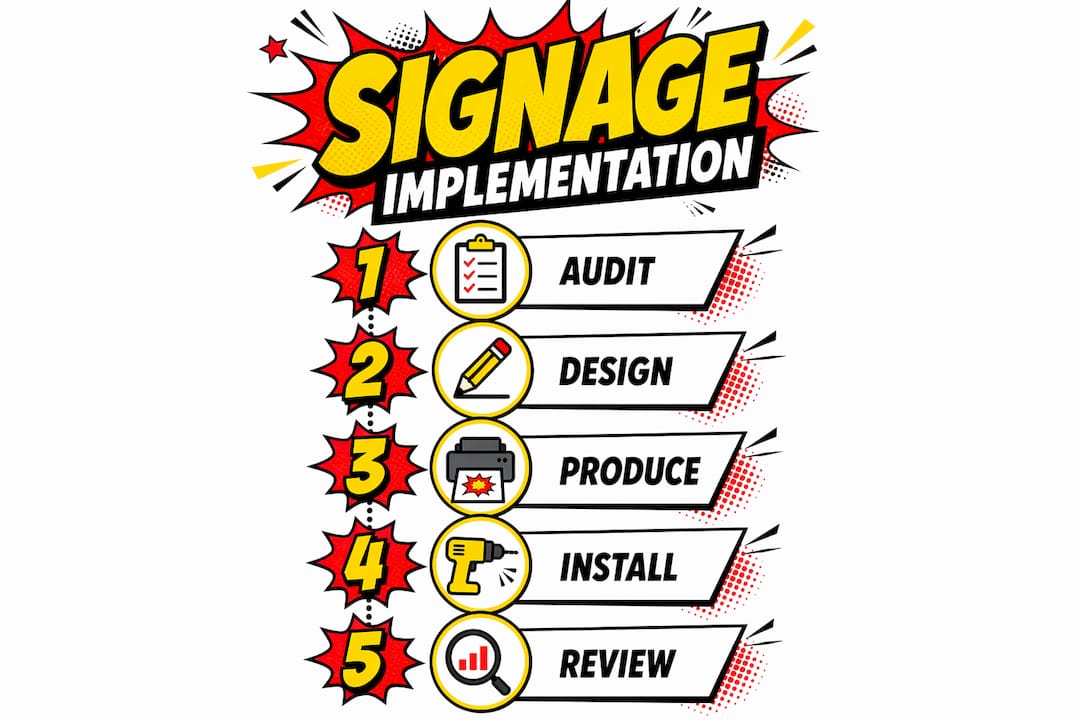
- Audit your current signage. Walk every route a new student or visitor would take. Note where people pause, double back, or ask for directions. These are your signage gaps. Use a school interior signage checklist to record what exists and what is missing.
- Map your communication needs. Separate permanent needs (room identification, emergency routes) from dynamic needs (timetables, events, announcements). This distinction drives your material and technology choices.
- Choose materials for the environment. Indoor signs in dry corridors can use aluminium composite or acrylic. Outdoor signs need UV-resistant substrates and weatherproof fixings. High-traffic areas such as dining halls benefit from anti-graffiti laminates that clean easily.
- Plan placement before ordering. Signs placed at eye level and visible from multiple angles improve navigation; cluttered signage reduces effectiveness. The standard eye-level height for adult wayfinding is 1,500 mm to 1,800 mm from the floor. For primary schools, drop this to 1,200 mm to 1,400 mm.
- Select a digital signage platform with centralised management. Digital signage software with centralised management and flexible scheduling reduces burden on IT personnel and improves content relevance. Look for a platform that allows non-technical staff to update content without IT support.
- Install and review. After installation, repeat your audit walk. Ask students and staff whether they found the new signs helpful. Adjust placement or sizing based on real feedback before the project is formally closed.
| Implementation stage | Common mistake | Better approach |
|---|---|---|
| Audit | Skipping it entirely | Walk every visitor route before specifying anything |
| Material selection | Using indoor materials outdoors | Match substrate to environment and traffic level |
| Placement | Mounting too high or behind obstructions | Follow height guidelines; check sightlines from multiple angles |
| Digital content | Overloading screens with information | Limit each screen to one or two messages at a time |
Pro Tip: Involve a small group of students in your placement review. They will spot problems that adults overlook, particularly in primary and secondary corridors where sightlines differ from adult height.
What are the most common challenges with school signage systems?
School signage projects run into predictable problems. Knowing them in advance lets you plan around them rather than react to them.
- Compliance gaps: Many schools discover their existing room signs do not meet current accessibility standards only when an audit or complaint forces the issue. Scheduling a compliance review every three years, or after any significant building work, prevents this from becoming a legal liability.
- Material wear: Outdoor signs in the UK face significant weathering from rain, UV exposure, and temperature fluctuation. Vinyl lettering on foam board degrades within 12–18 months outdoors. Specify aluminium or dibond substrates for any sign that lives outside.
- Curriculum and staff changes: A sign bearing a teacher’s name becomes incorrect the moment that teacher moves rooms or leaves. Modular sign systems with replaceable inserts solve this without the cost of full replacement. This is one area where the upfront investment in a quality modular system pays back quickly.
- Accessibility for students with disabilities: Beyond Braille and tactile requirements, consider contrast levels for students with visual impairments and positioning for wheelchair users. The impact of signage on learning environments extends directly to how included or excluded a student feels within the physical space.
- Sign fatigue and clutter: Too many signs in one area cancel each other out. Visitors stop reading when every surface competes for attention. Audit for redundancy and remove signs that duplicate information available within two metres.
School signage is a silent, immediate communicator of culture. The first 60 seconds in a school influence perceptions of management efficacy and commitment to inclusivity.
Digital signage reduces physical sign fatigue by consolidating multiple messages onto a single screen that rotates content on a schedule. One well-placed screen in a reception area can replace six or seven printed notices without losing any information.
Key takeaways
Effective school signage combines legal compliance, clear design, and practical placement to create environments where students and visitors navigate confidently and feel genuinely welcomed.
| Point | Details |
|---|---|
| Compliance is non-negotiable | Permanent room signs must carry raised characters and Braille under ADA and UK accessibility standards. |
| Design for legibility first | Use sans-serif fonts, strong contrast ratios, and consistent icons across every sign on campus. |
| Plan placement before purchasing | Mount signs at the correct eye level for your age group and check sightlines from multiple angles before ordering. |
| Digital signage reduces operational burden | Centralised management platforms let non-technical staff update content without IT support. |
| Modular systems save long-term costs | Replaceable inserts handle staff and room changes without requiring full sign replacement. |
Pikpikpow’s view on where school signage is heading
The schools that get signage right treat it as part of their operational infrastructure, not as a cosmetic afterthought. After working with educational facilities across the UK, what strikes me most is how often signage is the last item on a refurbishment budget and the first thing visitors notice. That disconnect is costly.
The legal baseline, ADA compliance, BS 5499 emergency signs, and accessible room identification, is the floor, not the ceiling. The schools that stand out are the ones that go further: they use colour zoning to make campuses genuinely intuitive, they deploy digital screens that speak to students in a visual language they already understand, and they build modular systems that can absorb change without constant expenditure.
The next shift I see coming is interactive wayfinding. Touch-screen kiosks at school entrances that allow visitors to search for a room or staff member by name are already appearing in larger secondary schools and universities. They reduce the burden on reception staff and give visitors a sense of control from the moment they arrive. For primary schools, the equivalent is richer pictogram systems that serve non-readers and non-English speakers equally well.
My practical advice is this: do not wait for a complaint or a compliance audit to review your signage. Walk your school as a visitor once a year. You will see it differently every time.
— PikPikPOW!
Signage solutions for educational spaces from Pikpikpow
Pikpikpow works with schools and educational facilities across the UK to design and install signage systems that meet compliance requirements and genuinely improve the daily experience of students, staff, and visitors.
From wayfinding and internal signage to fully managed digital signage solutions, Pikpikpow handles design, production, and installation as a single managed process. Every project starts with a site assessment so the specification matches your actual environment, not a generic template. If you are planning a refurbishment, a new build, or simply bringing an ageing signage system up to current standards, Pikpikpow’s signage systems range covers the full scope of what educational facilities need.
FAQ
What is educational space signage?
Educational space signage is the complete system of signs within a school or learning facility that supports wayfinding, safety, room identification, and communication. It includes both physical signs and digital displays.
Which signs are legally required in UK schools?
Emergency exit signs must comply with BS 5499 pictogram standards, and permanent room signs must carry raised characters and Braille to meet accessibility requirements. Failure to meet these standards creates legal liability.
How does digital signage benefit schools?
Digital signage captures student attention immediately on entry, with 87% of students noticing screens straight away. It consolidates multiple messages onto a single managed display, reducing printed notice clutter and keeping information current.
How often should school signage be reviewed?
A full signage audit every three years is a sound minimum, with additional reviews after any building work or significant organisational change. Annual walkthroughs as a first-time visitor catch problems that familiarity causes staff to overlook.
What materials work best for outdoor school signs?
Aluminium composite and dibond substrates with UV-resistant inks are the standard choice for outdoor educational signage in the UK. Vinyl on foam board degrades quickly in wet and variable conditions and is not suitable for permanent outdoor use.