

TL;DR:
- Retail signage workflow instructions define the steps and roles needed to plan, produce, and maintain signs effectively. A clear process reduces errors, ensures brand consistency, and saves costs during installation and updates. Proper site surveys, risk-based approvals, and standardized file standards are essential for successful signage projects across multiple locations.
Retail signage workflow instructions are the defined steps and responsibilities that businesses use to plan, produce, approve, and maintain signs that drive customer engagement and reinforce brand identity. In industry terms, this process is often called a signage project workflow or signage production process. Without a clear workflow, retail businesses face inconsistent branding, costly reprints, and missed installation deadlines. This guide covers every stage from initial planning and site surveys through design approval, fabrication, and ongoing content governance, drawing on current best practices for both traditional and digital signage across multi-location retail environments.
What are the essential components of retail signage workflow instructions?

A well-structured signage project workflow depends on three foundations: shared templates, defined roles, and publishing metadata. Without all three, even small retail teams produce inconsistent output.
Shared template libraries reduce the burden on non-designers and enforce brand standards from the start. When content creators work from pre-approved layouts, the number of design revisions drops significantly. Templates also make it faster to produce seasonal or promotional content without starting from scratch each time.
Role definitions determine who can create, review, approve, and publish signage content. A typical retail workflow assigns four roles:
- Content creators: Store managers or marketing teams who draft new signage content.
- Reviewers: Brand or compliance officers who check accuracy and brand alignment.
- Publishers: Authorised users who release approved content to screens or print production.
- Administrators: IT or operations staff who manage permissions and system settings.
Publishing metadata is the often-overlooked component that separates professional workflows from ad hoc ones. Metadata fields such as target screen group, start and end dates, location, and priority level reduce publishing errors across distributed teams. A sign scheduled for a Manchester store should never appear in a Bristol window. Metadata prevents that.
Technology platforms fall into two categories: cloud-based and on-premises. Cloud-based systems suit multi-location retailers because updates push instantly to all sites. On-premises systems offer tighter data control but require local IT resource. Most UK retail chains now favour cloud platforms for their speed and remote management capability.
Pro Tip: Build your metadata schema before you build your templates. Deciding on fields like “campaign type,” “store region,” and “expiry date” upfront saves significant rework later.
How to implement step-by-step workflow instructions for signage production
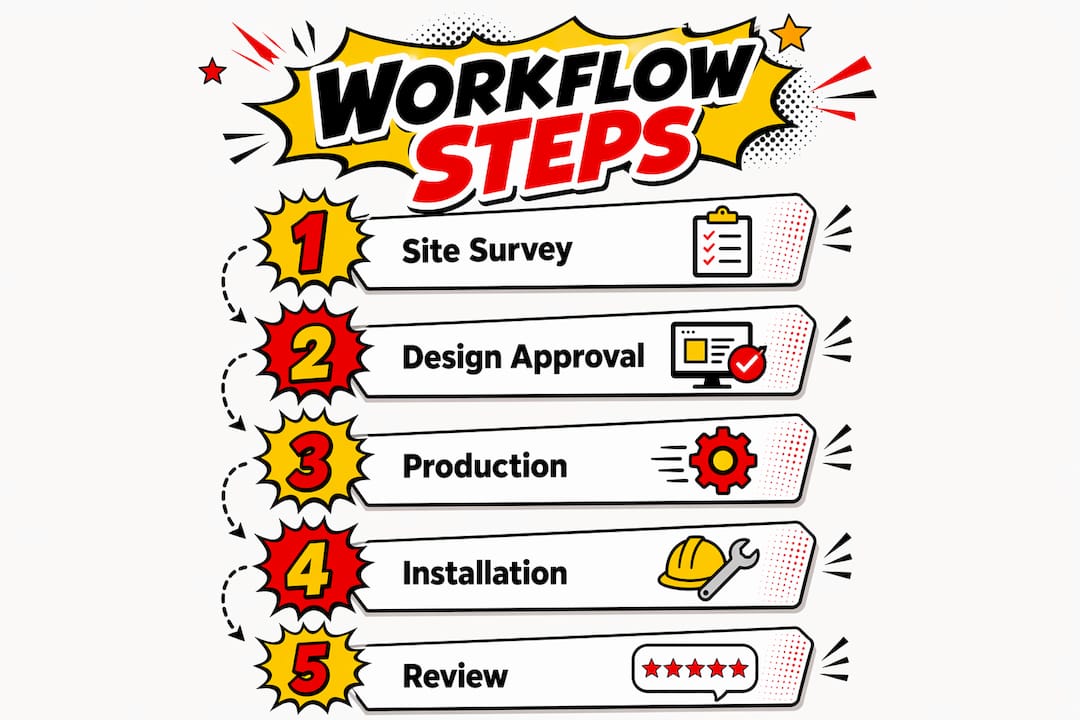
The signage production process runs from site survey to post-installation sign-off. Each step builds on the last, and skipping any one of them creates problems downstream.
Conduct a thorough site survey. Measure every dimension accurately, including height, width, and depth of the installation area. Inaccurate measurements are one of the leading causes of installation failure. Record structural mounting options, surface materials, and any obstructions.
Document with photographs. Take wide-angle context shots and close-up detail photos of fixing points, surfaces, and surrounding architecture. Comprehensive photo documentation significantly reduces fabrication and installation rework by resolving constraints before production begins.
Check electrical infrastructure for illuminated signs. For any lit fascia sign, LED display, or lightbox, record voltage availability, conduit presence, and distance from the nearest electrical panel. Missing electrical details on installation day can halt an entire project.
Develop and approve the design. Share design files with brand, legal, and operations reviewers. Apply brand standards for colour, typography, and logo placement. Confirm all copy is proofread, paying particular attention to proper nouns, addresses, and telephone numbers.
Prepare production-ready files. Submit artwork at 100% scale with all fonts outlined. Design handoff standards including scale accuracy and font management reduce misinterpretation by fabricators and installation teams.
Manage fabrication and quality control. Review a physical or digital proof before full production runs. Check colour accuracy, material finish, and structural integrity against the approved specification.
Coordinate logistics and delivery. Confirm delivery windows with the installation team in writing. Agree access arrangements with the store manager, particularly for installations during trading hours.
Install and validate. Complete installation to the agreed specification and photograph the finished result from multiple angles. Obtain sign-off from the site contact before the installation team leaves.
The table below summarises each stage and its primary owner.
| Stage | Primary owner | Key output |
|---|---|---|
| Site survey | Project manager | Measurement sheet and photo pack |
| Design approval | Brand or marketing lead | Approved artwork file |
| File preparation | Designer | Production-ready file at 100% scale |
| Fabrication QC | Production manager | Approved proof sign-off |
| Logistics | Operations coordinator | Confirmed delivery and access schedule |
| Installation sign-off | Site manager | Photographic completion record |
Pro Tip: Always confirm mounting access and delivery logistics in writing before fabrication begins. Verbal agreements cause delays when site conditions change.
What are best practices for approval workflows in multi-location retail?
Content governance for retail signage requires explicit role responsibilities and formalised approval workflows that vary by risk level and compliance requirements. A single approval process does not suit every type of message.
Risk-based approval routing matches the number of review steps to the potential impact of an error. Low-risk content, such as internal staff notices, may need only one reviewer. High-risk content, such as promotional pricing, legal disclaimers, or safety messaging, requires multi-step approval involving marketing, legal, and operations. Approval workflows should match message risk, with IT controlling publishing rights rather than approving content.
The content lifecycle covers five stages that every piece of signage should pass through:
- Creation: Content is drafted using approved templates.
- Review: Assigned reviewers check accuracy, brand compliance, and legal requirements.
- Approval: Authorised publishers release content for production or display.
- Expiry: Content is automatically removed or flagged for review at a set date.
- Archiving: Approved historical content is stored for future reference or reuse.
Deployment strategy is the other key governance decision. Centralised corporate content maintains brand consistency across all locations. Localised store content allows individual sites to respond to local promotions or community events. The most effective approach combines both: corporate templates with defined zones where local teams can insert approved local content.
The comparison below shows when to use each deployment model.
| Deployment model | Best suited for | Risk level |
|---|---|---|
| Centralised corporate | Brand campaigns, pricing, legal notices | Low, tightly controlled |
| Localised store | Community events, local promotions | Medium, requires local approval |
| Hybrid | Multi-location chains with regional variation | Managed, with clear permission tiers |
Role-based access control prevents unauthorised changes. Assign permissions by job function, not by individual, so that staff changes do not disrupt the workflow. Review permissions quarterly to remove access for leavers and update roles for promotions.
How to avoid common mistakes in retail signage projects
Spelling errors on printed signage are among the most expensive mistakes a retail business can make. A proofing step focused on proper nouns prevents costly last-minute corrections. Brand names, street addresses, and telephone numbers deserve a dedicated check separate from general copy review.
The most frequent errors in retail signage projects fall into five categories:
- Incorrect measurements: Failing to verify dimensions on site before production leads to signs that do not fit. Always re-measure before submitting files to the fabricator.
- Font and file errors: Unoutlined fonts substitute on the fabricator’s system, changing the appearance of the finished sign. Submit every file with fonts converted to outlines.
- Inadequate site survey: Missing photos or incomplete electrical notes create problems during installation. Use a field checklist to standardise what every survey must capture.
- Poor delivery coordination: Arriving at a site without confirmed access or a clear unloading plan wastes time and can damage materials. Confirm logistics at least 48 hours before installation.
- Skipped proofing steps: Approving a design on screen without a physical proof can miss colour shifts or material issues. Request a physical sample for any high-volume or high-visibility sign.
Pro Tip: Assign one person as the sole proofreader for each project. Shared proofreading responsibility often means nobody checks carefully, because everyone assumes someone else has.
Signage effectiveness also depends on placement. Visibility at the moment of customer decision is as important as design quality. Build a placement validation step into your installation sign-off to confirm that signs are readable from the intended customer viewpoint.
Which digital signage practices should retail businesses adopt?
Effective digital signage depends more on clear content workflows and refresh processes than on hardware alone. Defined content ownership and scheduled refresh cycles keep promotions and seasonal creative current. Without these, screens quickly display outdated pricing or expired campaigns, which damages customer trust.
Practical digital signage management requires the following:
- Assign content owners. Each screen zone or campaign type should have a named owner responsible for updates. Ownership without a named individual means content goes stale.
- Schedule refresh cycles. Set calendar reminders for weekly, monthly, and seasonal content reviews. Promotional content should expire automatically on the platform rather than relying on manual removal.
- Use templates for rapid updates. Pre-built templates allow store teams to swap product images or pricing without redesigning layouts. This keeps brand standards intact while reducing turnaround time.
- Integrate with retail systems. Connecting digital signage platforms with point-of-sale (POS) or inventory systems allows pricing and stock information to update automatically. This removes a manual step and reduces the risk of displaying incorrect information.
- Enable remote management. Cloud-based platforms allow head office teams to push updates to all locations simultaneously. Remote reporting confirms which screens are live and which require attention.
For multi-location retailers, digital signage solutions that support remote management and template-based publishing are the most practical choice. They reduce the workload on individual store teams while maintaining central brand control.
Key takeaways
A structured retail signage workflow, covering site surveys, risk-based approvals, production file standards, and defined content ownership, is the single most reliable way to reduce errors and maintain brand consistency across locations.
| Point | Details |
|---|---|
| Site survey accuracy | Capture precise measurements, photos, and electrical details before any design work begins. |
| Risk-based approvals | Match the number of approval steps to the potential impact of a signage error. |
| Production file standards | Submit artwork at 100% scale with fonts outlined to prevent fabrication errors. |
| Content ownership | Assign a named owner to each digital signage zone to keep content current and accurate. |
| Placement validation | Confirm sign visibility from the customer’s viewpoint as part of every installation sign-off. |
What we have learned from managing retail signage workflows
Working across retail, construction, and commercial interiors, the pattern we see most often is this: businesses invest heavily in design and materials, then lose time and money at the workflow stage. A beautifully designed fascia sign arrives on site and does not fit because nobody re-measured after the initial survey. A digital screen runs a Christmas promotion in february because no expiry date was set.
The fix is rarely expensive. Simple processes with clear responsibilities encourage adoption and reduce errors in multi-department signage projects. A one-page site survey checklist and a two-step approval process will outperform a complex system that nobody follows.
We also see businesses underestimate the value of a formal proofing chain. A formal approval chain established early in a signage project dramatically cuts expensive last-minute rework. One missed apostrophe on a printed fascia sign can mean a full reprint. That cost is avoidable.
The tension between central control and local flexibility is real, particularly for multi-site retailers. Our advice is to default to central control for anything brand-critical or legally sensitive, and give local teams a clearly defined space for local content. That boundary, written into your permissions structure, prevents both brand drift and the frustration of store managers who cannot respond to local opportunities.
Finally, do not treat the installation sign-off as a formality. Photographs taken at completion protect both the retailer and the supplier if questions arise later. They also create a reference library for future rollouts at similar sites.
— Pikpikpow
How Pikpikpow supports retail signage projects from survey to screen
Pikpikpow works with retail businesses across the UK to design, produce, and install signage that performs from day one. Whether you need a full signage systems rollout across multiple locations or a single high-impact shopfront, the team brings design expertise and manufacturing precision to every project.
From architectural fascia signs and wide-format print to fully managed digital signage with remote content management, Pikpikpow handles the production process end to end. The team also provides project guidance to help retail businesses build the approval workflows and site survey standards that prevent costly errors. If you are planning a signage project and want a supplier who understands the full workflow, get in touch with Pikpikpow to discuss your requirements.
FAQ
What are retail signage workflow instructions?
Retail signage workflow instructions are the defined steps, roles, and approval processes a business uses to plan, produce, and maintain signage. They cover everything from site surveys and design approval to fabrication, installation, and ongoing content management.
Why is a site survey critical before signage production?
Inaccurate measurements and overlooked site conditions are leading causes of installation failure. A thorough site survey captures precise dimensions, structural mounting options, electrical infrastructure, and photographic documentation before any design or fabrication work begins.
How many approval steps does retail signage need?
The number of approval steps should match the risk level of the content. Low-risk internal notices may need one reviewer, while promotional pricing or safety messaging typically requires sign-off from marketing, legal, and operations teams.
What file format should I submit for signage production?
Submit production files at 100% scale with all fonts outlined. This prevents font substitution on the fabricator’s system and ensures the finished sign matches the approved design exactly.
How often should digital signage content be refreshed?
Content refresh frequency depends on campaign type, but promotional content should have an automatic expiry date set at the point of publishing. Seasonal and evergreen content benefits from a scheduled monthly review to confirm accuracy and relevance.